

Organizations continue to look for practical ways to simplify reporting, reduce repetitive work, and turn data into timely action. During our August 26, 2026 webinar, “Using Power Automate to Provide More Power to Power BI,” participants answered three questions about Power Automate familiarity, reporting challenges, and automation priorities. Their responses point to a clear opportunity: connect fragmented data, reduce manual preparation, and make reporting workflows more responsive.
Interest Is High, but Adoption Is Still Developing
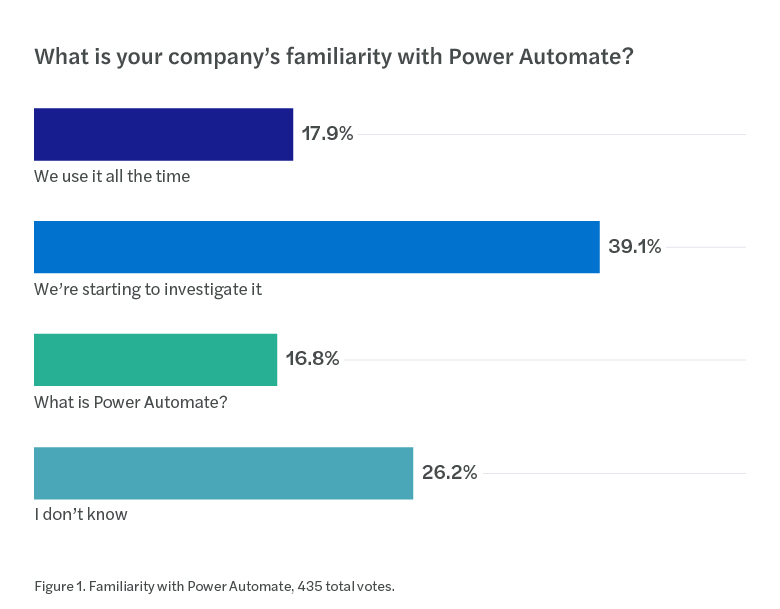
The largest group, 39.1%, said their company is starting to investigate Power Automate. Another 16.8% selected “What is Power Automate?” and 26.2% selected “I don’t know.” Only 17.9% reported using it all the time.
The results suggest that most respondents are not yet at a mature stage of adoption. For organizations already using Microsoft tools, that creates room to identify focused, high-value use cases before attempting broad automation. Reporting distribution, notifications, approvals, and recurring data movement can provide practical starting points.
Disconnected Data Is the Leading Reporting Barrier
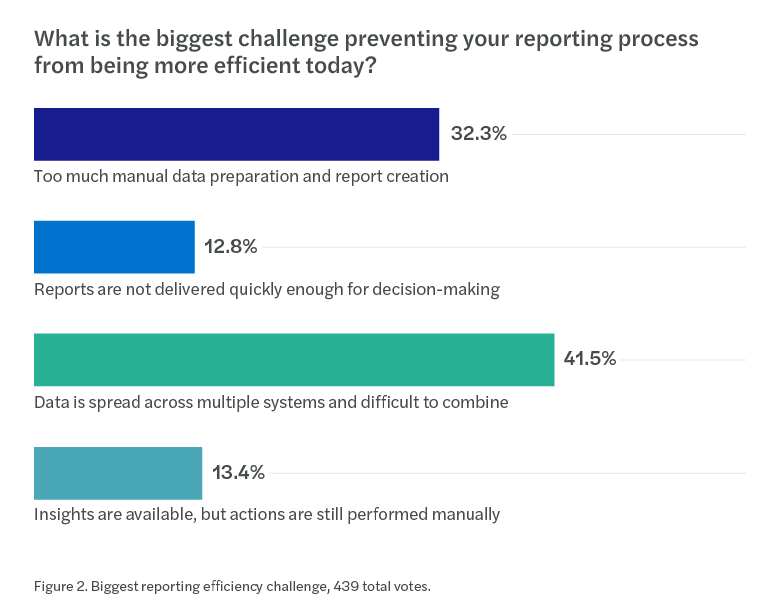
Data spread across multiple systems was the most frequently selected challenge at 41.5%. Too much manual data preparation and report creation followed at 32.3%. Smaller shares cited insights that still require manual action, 13.4%, and reports not arriving quickly enough for decision making, 12.8%.
Together, the two leading responses represent 73.8% of votes. The pattern highlights how reporting inefficiency often begins before a dashboard is viewed. Teams must first collect, combine, prepare, and distribute information. Connecting Power BI with Power Automate can help organizations design workflows that respond to data changes, distribute reports, and reduce repetitive handoffs.
Reporting & Integration Top the Automation Agenda
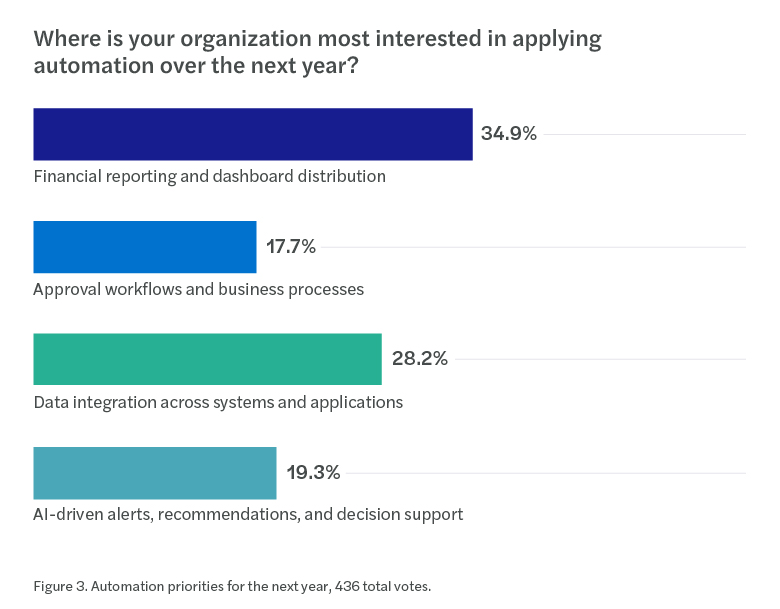
Financial reporting and dashboard distribution led future priorities at 34.9%, followed by data integration across systems and applications at 28.2%. AI-driven alerts, recommendations, and decision support received 19.3%, while approval workflows and business processes received 17.7%.
The top two choices account for 63.1% of responses. This emphasis aligns closely with the challenges participants identified: organizations want to connect information more effectively and improve how reporting reaches decision makers. Interest in AI-driven alerts also shows that some organizations are looking beyond static dashboards toward analytics that can prompt a response.
Three Considerations for Moving From Insight to Action
- Start with a measurable reporting bottleneck. Identify a recurring process where manual preparation, distribution, or follow-up creates delays. Define the intended improvement before selecting the automation.
- Connect systems with purpose. Focus integration efforts on the data needed for a specific decision or workflow rather than connecting applications without a clear business outcome.
- Build confidence before scaling. Begin with a contained use case, confirm governance and ownership, measure results, and then apply the lessons to additional processes.
Key Takeaway: Organizations are not simply looking for more reports. They are looking for smarter ways to connect data, reduce manual effort, and turn insight into action.
Explore What Reporting Automation Could Look Like
If disconnected systems or manual reporting processes are slowing your organization down, Forvis Mazars can help you evaluate how Microsoft Power BI and Power Automate may support more connected, responsive workflows. Start with a focused discussion about the reporting challenges and automation opportunities that matter most to your team.
Source & Methodology
Polling data shown in this article was provided from the webinar, “Using Power Automate to Provide More Power to Power BI.” Vote totals differ by question because response participation varied. Percentages are reproduced from the supplied polling results and may not sum to exactly 100% because of rounding.
How Forvis Mazars Can Help
If you have questions or need assistance, contact one of our Business Technology Services professionals about Power BI, Power Automate, and automated reporting workflows.