

Modern accounts payable teams continue to look for ways to simplify invoice handling, support timely payments, and improve visibility across the procure-to-pay cycle. Accounts payable in Microsoft Dynamics 365 Finance & Supply Chain Management is designed to support efficiency, clarity, and collaboration through its streamlined user experience, automation features, security controls, and connection to the Microsoft ecosystem. Managing your accounts payable in Dynamics 365, aka D365, provides a robust, centralized, and integrated platform for businesses of all sizes to modernize their accounts payable operations.
This article outlines key accounts payable capabilities in D365 and highlights the purpose and benefits of its core functionality.
System Functionality Overview
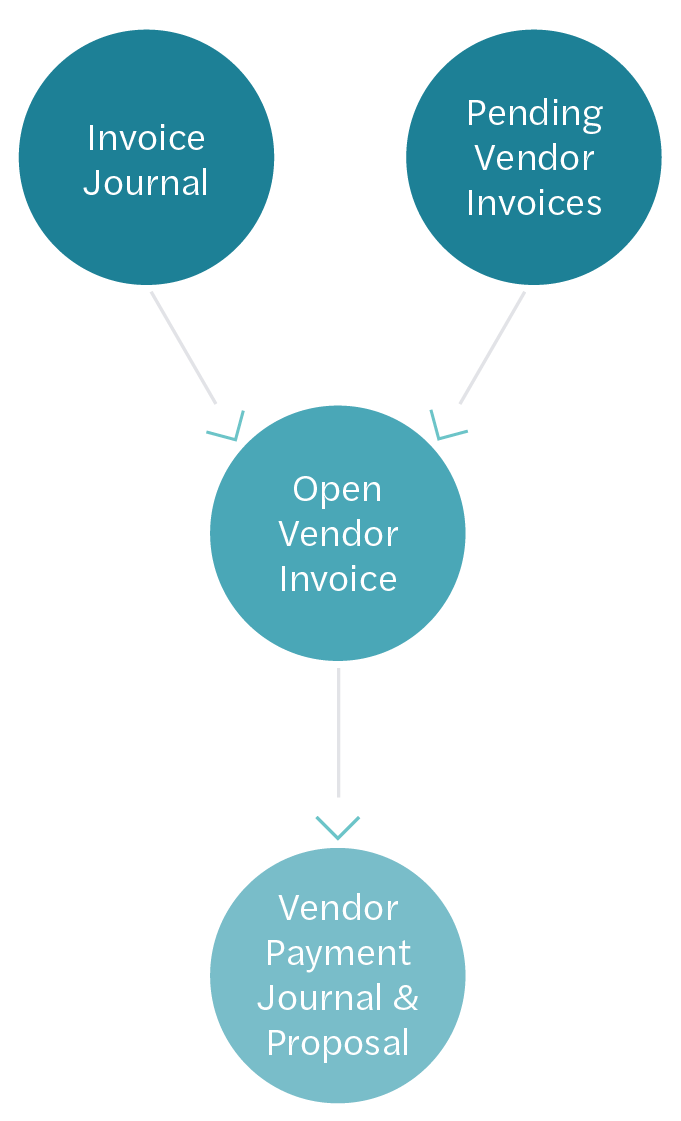
Within Microsoft Dynamics 365 Finance, there are two primary pathways that can be used to register, process, approve, and post vendor invoices:
- Invoice Journals
- Pending Vendor Invoices
Once an invoice is posted, it is transferred to the Open Vendor Invoices page, where all invoices that are awaiting payment reside.
To complete the payment of an invoice, a payment journal is first created, and then a payment proposal can be used to quickly select multiple invoices for payment based on various criteria.
Pending Vendor Invoices
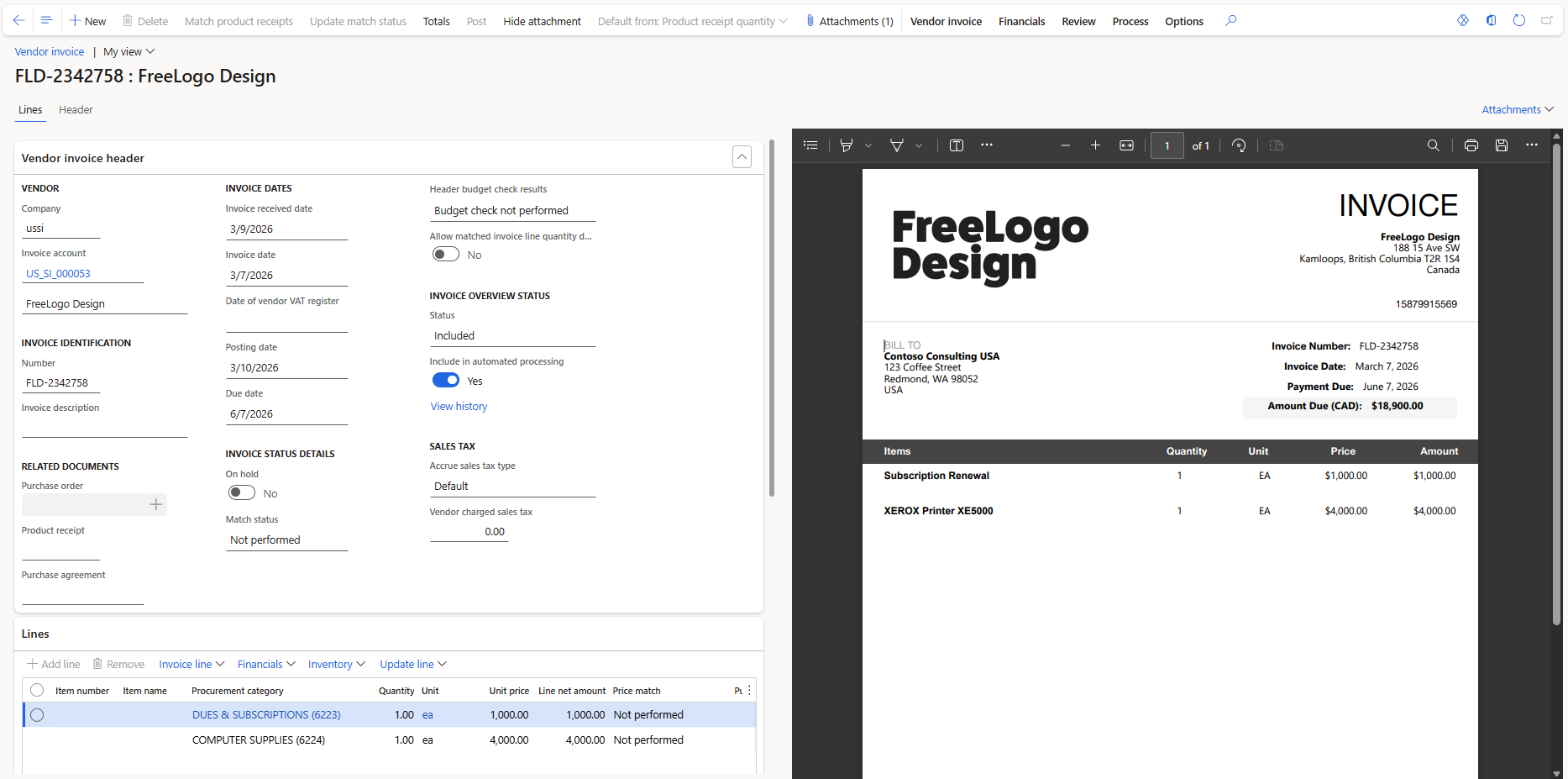
The pending vendor invoices page uses the Dynamics 365 vendor invoice framework to register a vendor invoice from a confirmed purchase order (PO). It allows for the processing of non-PO invoices by leveraging procurement categories. Key features include:
- Capability to easily attach invoice documentation and view the invoice attachment alongside key invoice information and entry fields.
- Automatic matching of invoice lines to purchase orders and their related receipts.
- Workflow routing that can separate approvers by invoice line and can leverage signing limits or a delegation of authority policy.
- Streamlined vendor invoice processing to automate invoice matching, submit invoices to workflow, and automatically post approved invoices.
 Click here to open image in a new tab
Invoice Journals
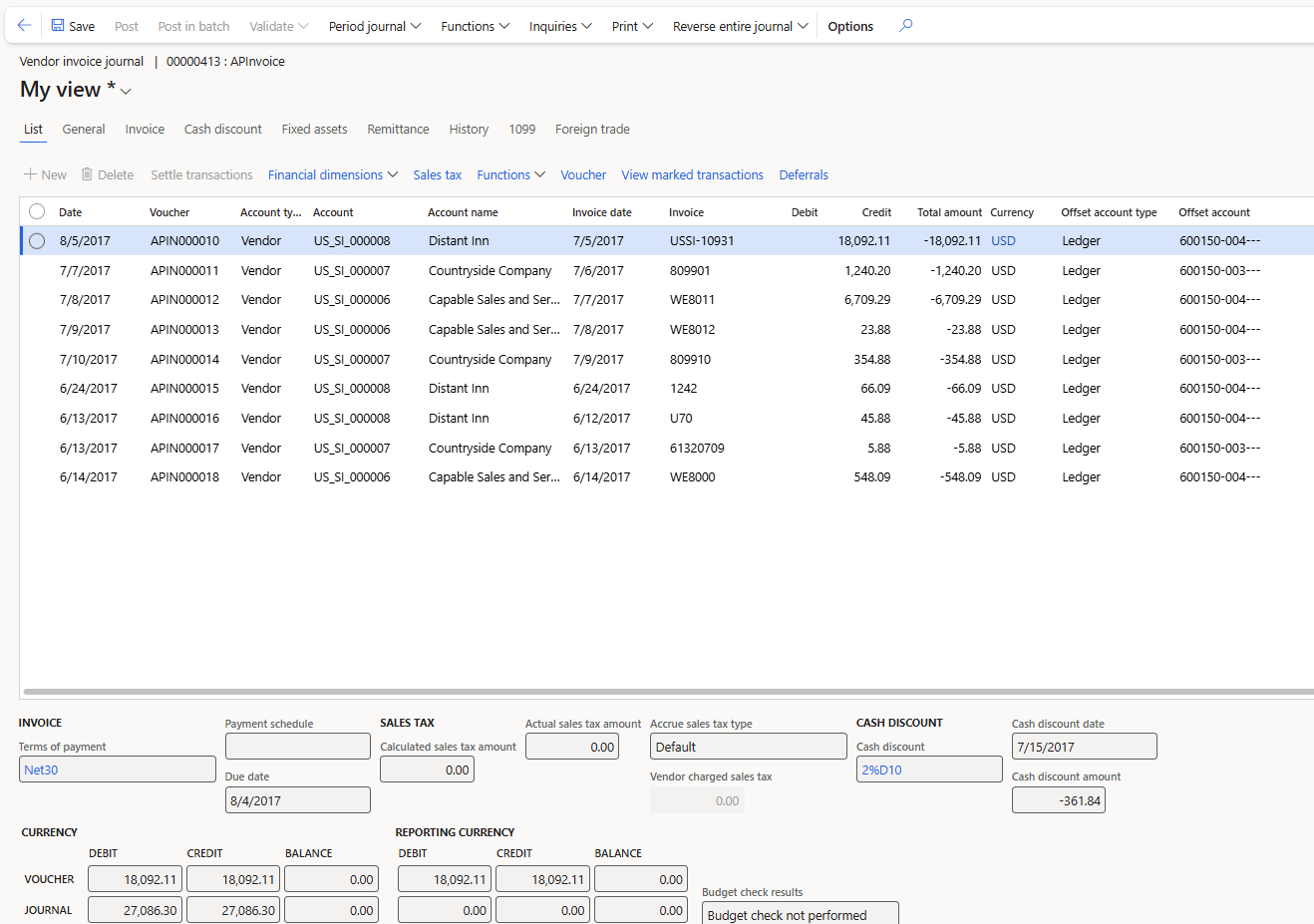
Vendor invoice journals in Dynamics 365 Finance streamline the entry of non‑PO vendor invoices, allowing accounts payable teams to code costs directly to the appropriate expense accounts and financial dimensions. This method is ideal for operational invoices that don’t require purchasing documents, while still supporting accurate accounting, compliance, and timely posting to the ledger.
 Click here to open image in a new tab
 Click here to open image in a new tab
Open Vendor Invoices
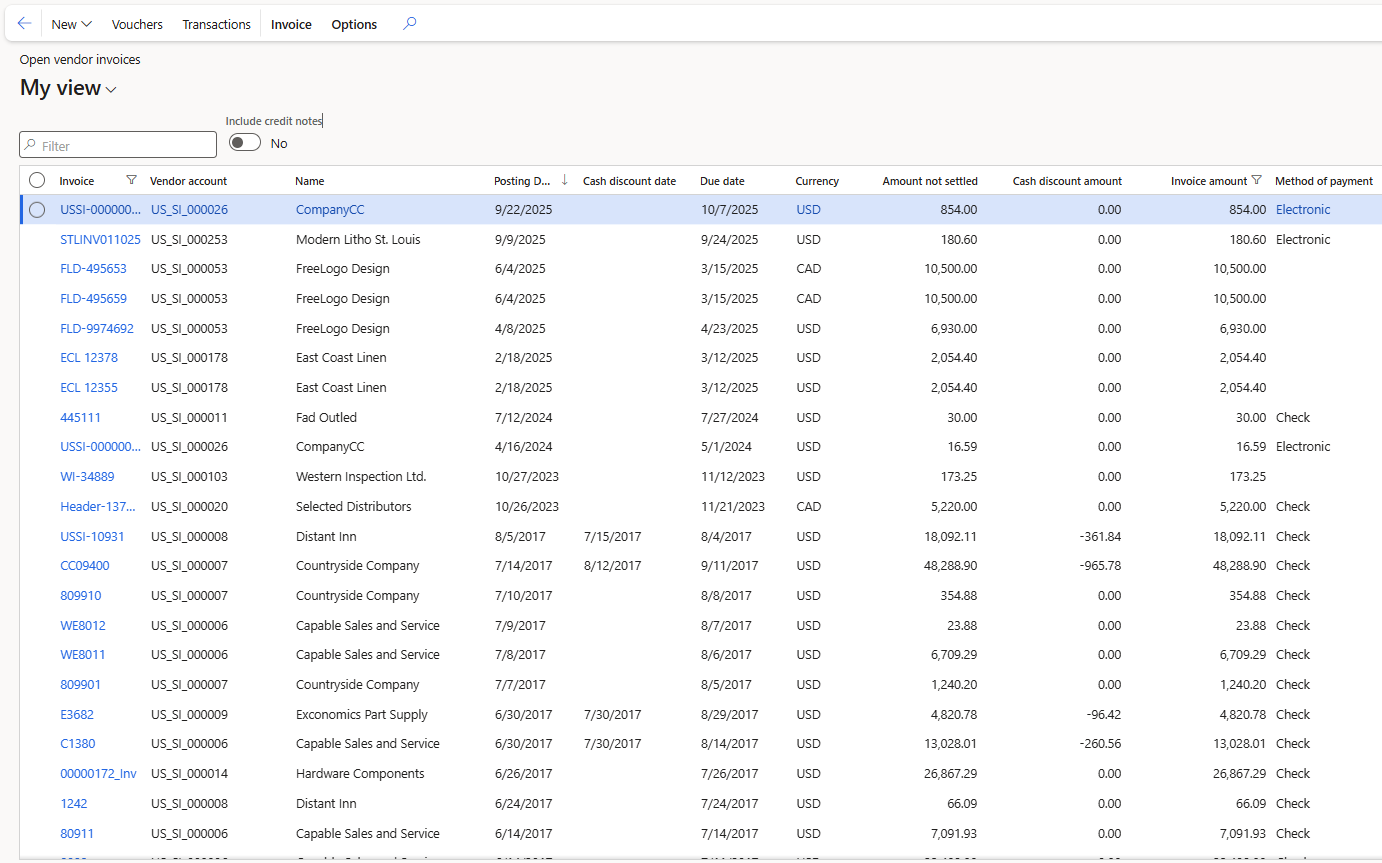
When an invoice is posted, it is transferred to the Open Vendor Invoices page. From here, users can manage and prioritize vendor payments and complete the following actions:
- Settle invoices for a vendor
- View the detailed postings of the invoice
- Update the due date of an invoice
- View payment details of an invoice, such as Method of Payment
- View invoices that have a Payment Hold
- Mark an invoice as “not approved” to block payment of specific invoices
 Click here to open image in a new tab
Vendor Payment Proposals & Journals
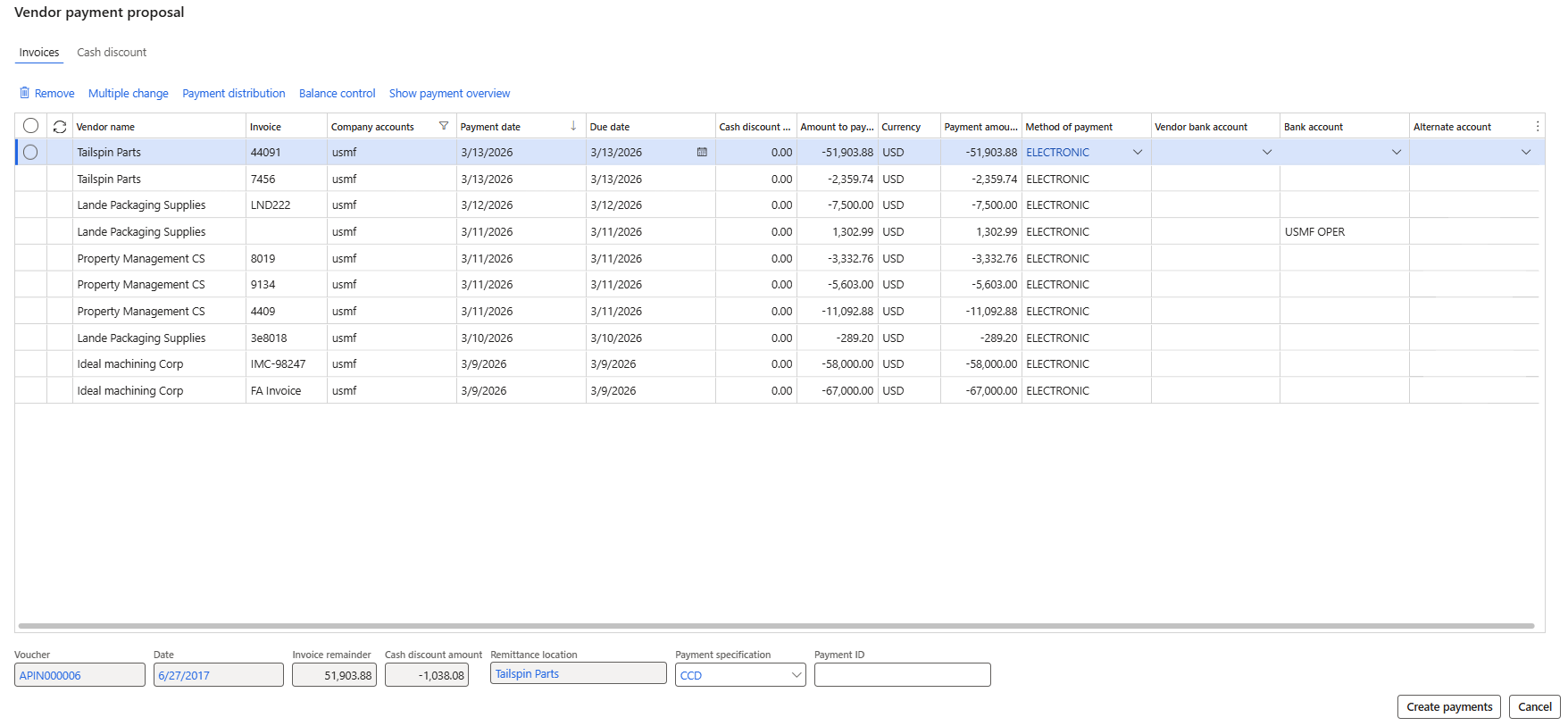
To pay an invoice, a payment journal is first created, and then a payment proposal can be used to help filter and identify invoices based on various criteria, such as:
- Due date
- Cash discount
- Amount limit for all payments
- Currency

Users can adjust selections and criteria, and the vendor payment proposal invoice preview will display all applicable invoices that can be paid. From here, invoices can be selected and removed, and payment attributes of individual invoices or multiple invoices can be edited simultaneously. Once the invoice preview is ready, users can select “Create payments” to populate the vendor payment journal with the invoices to be paid.
 Click here to open image in a new tab
Centralized Payments
Microsoft Dynamics 365 also supports centralized payments, allowing you to create and execute vendor payments for multiple legal entities using a single legal entity to handle all payment activities. Once configured, users can enable the option to include invoices from other legal entities when creating payment proposals. Once the payment journal has been posted and invoices are settled, the system will automatically create and post the due-to and due-from intercompany transactions.
How Forvis Mazars Can Help
The accounts payable capabilities within Dynamics 365 are designed to help support a more organized, consistent approach to accounts payable activity. Our team of technology consultants at Forvis Mazars can assist you in exploring how Microsoft Dynamics 365 Finance & Supply Chain Management aligns with your strategic business goals. Contact us to learn more about how you can strengthen your accounts payable processes with Microsoft Dynamics 365.