

Artificial intelligence (AI) capabilities in enterprise resource planning (ERP) systems, like Oracle NetSuite, are evolving rapidly. Organizations that delay modernization risk higher costs, growing inefficiencies, and decision bottlenecks. NetSuite’s embedded AI features, combined with the NetSuite AI Connector Service and Model Context Protocol (MCP), offer a governed, scalable pathway to modernize without compromising control.
This article provides a practical overview of the core features, how they work, and where organizations can gain value quickly.
Why NetSuite AI Matters
NetSuite’s native AI features now support contextual summaries, exception insights, and data‑driven analysis directly inside the application. The AI features can interpret ERP data, explain trends, and highlight risks across financials, operations, and customer activity.
Some useful and increasingly common prompts include:
- “Explain the root cause of these exceptions and summarize corrective actions.”
- “Summarize this customer’s recent activity and highlight overdue invoices.”
- “Explain the drivers behind this revenue trend and identify segments at risk.”
- “Summarize today’s activity and highlight bottlenecks impacting throughput.”
These prompt‑to‑insight interactions can help teams spend less time diagnosing issues and more time on strategic initiatives.
Key Embedded AI Capabilities
Exception Management: NetSuite AI can identify discrepancies, anomalies, and outliers that require action based on rules you can set within the system. This can help teams triage issues quickly. Using data already in NetSuite, the system can summarize exception drivers and recommend next steps.
Record & Activity Summaries: AI‑generated summaries can provide quick context for transactions, customers, or daily activity dashboards to help reduce manual review time and give leaders an accurate snapshot of performance.
AI‑Enhanced Analytics: Within dashboards such as Revenue and Customer Analysis, AI tools can interpret visual trends and surface contributing factors, risks, and insights that would otherwise require manual data exploration.
These features are designed to enhance decision making and reduce complexity and manual processes.
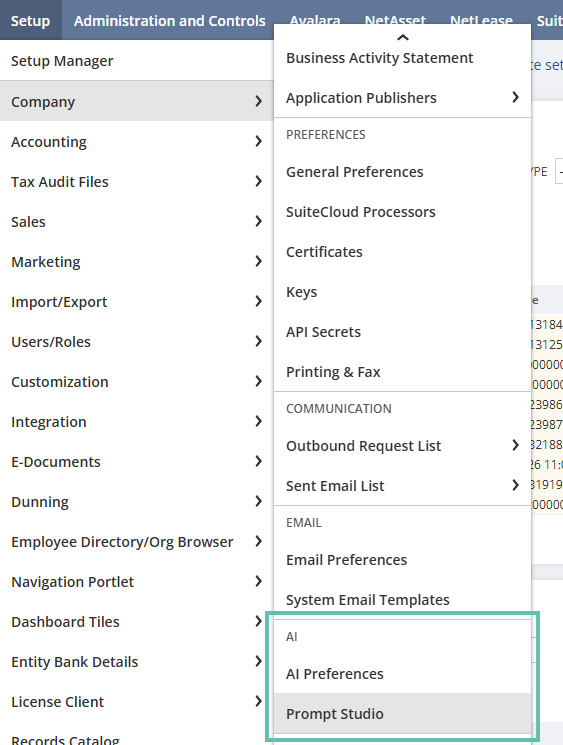
Quick Insight: One area to watch is how NetSuite continues to expand its embedded AI capabilities. The screenshot below highlights how NetSuite is already surfacing guided insights inside the system. Stay tuned to how this type of in‑line intelligence may evolve in upcoming NetSuite releases. NetSuite follows a predictable release pattern each year, with two major updates. The 2026.1 release, which represents the spring cycle, has already begun rolling out. The 2026.2 release, representing the fall cycle, is expected later in the year, typically around September or October.
How MCP Expands AI Capabilities Securely
Organizations increasingly want to connect external AI tools, e.g., Claude, ChatGPT, etc., to NetSuite. The NetSuite AI Connector Service, built on the MCP, helps provide necessary security.
MCP provides:
- Structured communication between AI clients and NetSuite.
- Role‑based access enforcement, safeguarding that AI can only do what the user is allowed to do.
- Auditability of each AI‑initiated action.
- Governance controls aligned with existing NetSuite permissions.
MCP provides critical guardrails so that AI follows the same rules, permissions, and auditability as human users.
This framework helps teams expand AI capabilities without introducing unmanaged automation and risk.
Configuration Essentials
While technical setup traditionally falls under the IT department, business leaders also should understand the governance foundation behind AI access.
1. Core Features Must Be Enabled
The AI Connector requires SuiteCloud features such as:
- OAuth 2.0
- REST Web Services
- Server SuiteScript
These features establish secure, authenticated communication channels.
2. Role‑Based Access Is Critical
AI should use purpose‑built roles with restricted permissions, including:
- MCP Server Connection
- Log in using OAuth 2.0 Access Tokens
The external AI tool being connected should never be assigned NetSuite administrator‑level access. A purpose‑built role with restricted access helps reduce risk and keep AI interactions intentionally scoped.
3. Ongoing Monitoring Protects Stability
IT teams should periodically review:
- Integration records
- Concurrency usage
- Health of the AI connection
These checks help the connector remain authorized, stable, and aligned with governance expectations.
Where Organizations Can See Value Quickly
The AI and MCP features highlighted above support operational use cases across:
- Finance, for exception insights, revenue trend analysis, variance explanations, and more.
- Operations, including daily activity snapshots and approval bottleneck summaries.
- Customer relationship management (CRM), for customer engagement summaries, overdue invoice alerts, and more.
- Leadership, designed for high‑level summaries of dashboards and KPIs for quick, contextual insights.
These workflows can help reduce manual review cycles and enable teams to make informed decisions faster.
Steps for Getting Started
- Assess your current SuiteCloud configuration to confirm readiness for AI and MCP features.
- Create a purpose-built role for an external AI tool to use that has restricted permissions to enforce appropriate access.
- Identify key workflows where AI summaries or exception insights can reduce manual effort.
- Standardize prompt guidance for your teams following the examples shown above (“Explain …,” “Summarize …,” “Highlight …,”).
- Establish monitoring routines for AI connector usage, concurrency, and authorization status.
How Forvis Mazars Can Help
NetSuite AI tools and capabilities, and especially MCP, offer organizations a secure, governed path to activate AI across ERP workflows. By combining embedded AI features with structured external AI connectivity, teams can uncover insights earlier, reduce effort, and modernize processes while maintaining robust controls.
Need help implementing or configuring NetSuite AI features? The NetSuite team at Forvis Mazars offers services designed to scale with your business, from startup to midsize enterprise. With readiness planning, disciplined testing, and adoption strategies, we can help your team realize value quickly and confidently.
As a certified Oracle NetSuite partner, we provide software implementation, integration, and consulting services. In addition, NetSuite at Forvis Mazars offers two premier program options:
- NetSuite Solution Provider – Helping your business get up and running with its own suite of NetSuite modules.
- NetSuite Business Process Outsourcing (BPO) – Helping fast-growing startups and small and midsize organizations supercharge their business management with outsourcing services.
Ready to see what’s possible? Connect with professionals at Forvis Mazars to discuss your NetSuite needs.